LoginRequest Your Free Trial

Restaurants Management System

متوافق مع امن وحماية البيانات والخصوصية

Compliance with data security and privacy

Restaurant POS & Order Management

Table & Reservation Management

Menu & Recipe Management

Kitchen & Order Tracking

Inventory Management

Reports Issuing

Featuer of Restaurant Management System

Restaurant Management System

Restaurant POS & Order Management

The system provides an integrated point-of-sale environment for managing restaurant orders efficiently from the moment they are created until payment is completed. Staff can create dine-in, takeaway, and delivery orders, add or modify items, apply discounts, manage different payment methods, and track order status. Orders can also be connected directly to tables, customers, waiters, and invoices, providing a complete view of each transaction and reducing manual errors during the ordering process.

Table & Reservation Management

The system enables restaurants to organize tables, seating arrangements, and customer reservations through a centralized platform. Staff can view table availability, assign customers to specific tables, manage reservations, and monitor occupied, available, or reserved tables. This helps restaurants optimize seating capacity, reduce conflicts between reservations, and provide a smoother experience for customers, especially during busy periods.

Menu & Recipe Management

The system allows restaurants to create and manage digital menus, including food items, beverages, categories, prices, descriptions, and available options. Menu items can be connected to recipes and ingredients, allowing management to maintain better control over how products are prepared and priced. Restaurants can also update menu information whenever needed, helping ensure that staff always work with accurate product and pricing information.

Reports & Management Dashboard

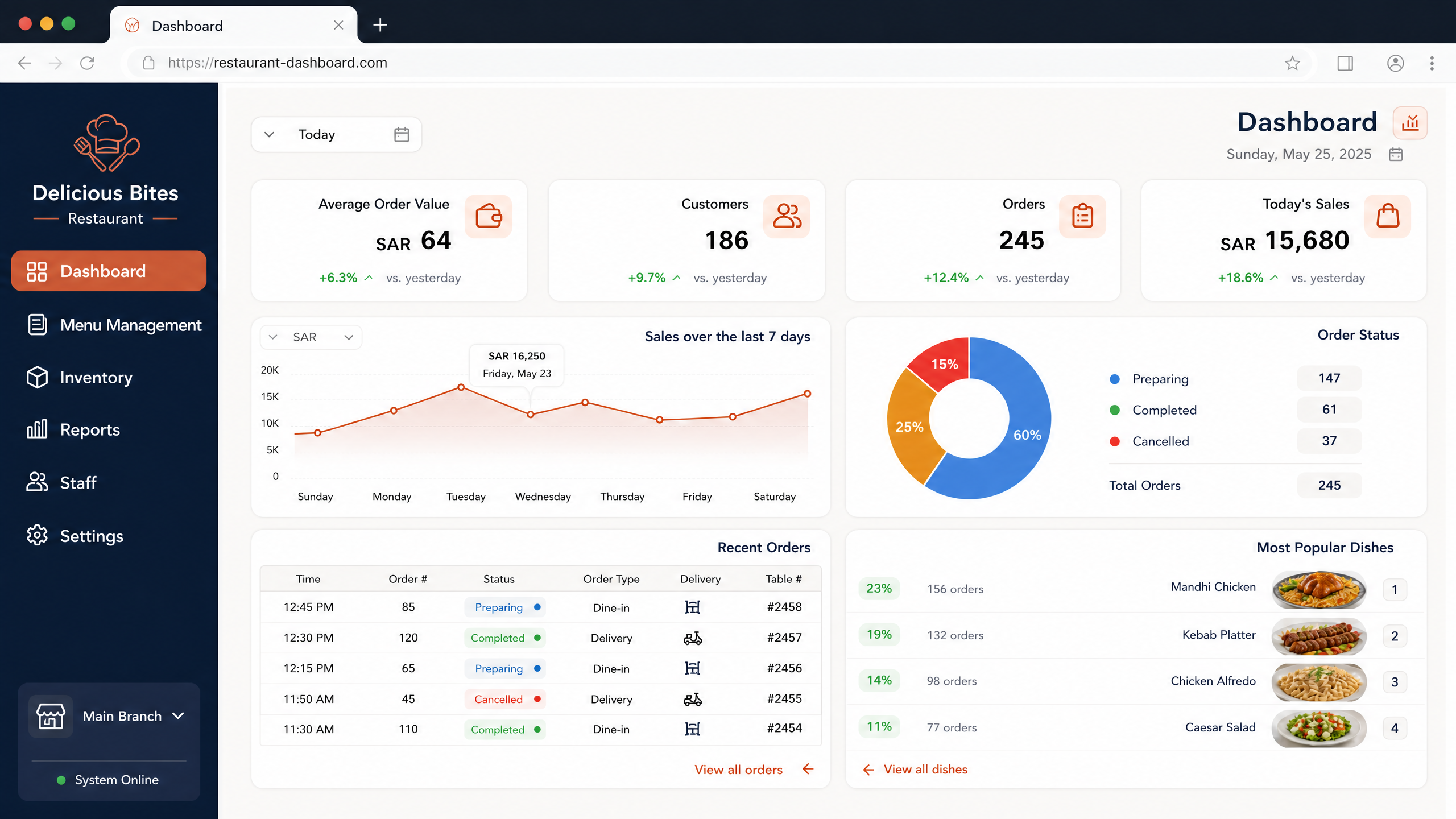
The system provides comprehensive dashboards and reports that give management a clear overview of restaurant performance. Users can monitor sales, orders, revenue, popular menu items, inventory movements, purchasing activities, payment transactions, and other key operational indicators. These insights help management evaluate performance, identify trends, control costs, understand customer demand, and make informed decisions based on organized and up-to-date business data.

Kitchen & Order Tracking

The system supports communication between the front-of-house and kitchen teams by organizing orders according to their preparation status. Orders can be sent to the appropriate kitchen section and monitored through different stages such as new, preparing, ready, and completed. This helps kitchen staff prioritize incoming orders, reduces communication gaps, and enables restaurant employees to monitor order progress and provide customers with more accurate service.

Inventory & Purchasing Management

The system helps restaurants monitor food ingredients, beverages, packaging materials, and other inventory items. Users can track quantities, stock movements, purchases, suppliers, and consumption, while recipes can be linked to ingredients to support more accurate inventory control. Management can also monitor low-stock items and purchasing requirements, helping reduce shortages, minimize waste, and maintain the availability of essential restaurant supplies.
```html
Restaurant Management Solution

Run Your Restaurant with Smarter Management and Better Control

An integrated digital solution designed to help restaurants manage orders, tables, menus, kitchen operations, inventory, sales, and daily activities through one connected platform.

Everything Your Restaurant Needs in One Platform

Restaurant operations involve multiple activities that need to work together throughout the day. From receiving customer orders and coordinating the kitchen to monitoring stock, managing tables, and reviewing sales, disconnected processes can create unnecessary delays and make operational control more difficult. The Restaurant Management System brings these essential functions together in a unified environment, helping restaurant teams work more efficiently and giving management better visibility across the business.

Connected Restaurant Operations

The system connects front-of-house, kitchen, inventory, sales, and management activities within one structured platform. Staff can access the information relevant to their responsibilities while management can maintain visibility across the restaurant's daily operations. This connected approach reduces dependency on separate tools and helps create a more consistent workflow from order creation through completion and payment.

A Better Customer Experience

Efficient restaurant service depends on accurate orders, well-coordinated tables, timely preparation, and smooth payment processes. The system helps staff organize these activities more effectively, allowing orders to move smoothly between service and kitchen teams while keeping customer and transaction information organized. This supports faster service and a more reliable experience for guests.

Powerful Tools for Restaurant Management

The system provides specialized capabilities for managing the key operational areas of a modern restaurant, from customer orders and dining tables to kitchen workflows, inventory, and business reporting.

01

Restaurant POS & Order Management

Manage dine-in, takeaway, and other order types through an integrated point-of-sale environment. Staff can create orders, add menu items, modify selections, apply discounts, and process different payment methods while maintaining accurate transaction records. Orders can be connected with tables, customers, staff members, and invoices, allowing restaurant teams to follow each transaction from the initial order until payment is completed. This helps reduce order-entry errors and provides a more organized sales process.

02

Table & Reservation Management

Organize the restaurant's seating capacity and customer reservations through a centralized interface. Staff can monitor table availability, assign guests to suitable tables, record reservations, and follow the current status of dining areas. The system helps coordinate reservations with available seating and reduces the possibility of conflicting bookings, enabling staff to manage busy periods with greater efficiency.

03

Menu & Recipe Management

Create and maintain a structured digital menu covering food items, beverages, categories, prices, descriptions, options, and other product information. Menu items can also be associated with recipes and required ingredients, giving management greater visibility into the resources needed to prepare each product. Changes to prices, availability, or menu structure can be managed centrally, helping staff work with consistent and up-to-date information.

04

Kitchen & Order Tracking

Improve coordination between service staff and kitchen teams by organizing incoming orders according to their preparation stage. Orders can be directed to the relevant kitchen area and monitored through stages such as new, in preparation, ready, and completed. This provides kitchen teams with clearer priorities while allowing front-of-house staff to understand the progress of each order and respond to customers more effectively.

05

Inventory & Purchasing Management

Maintain control over ingredients, beverages, packaging, and other restaurant supplies by tracking purchases, stock quantities, movements, and supplier information. Recipe-based consumption can help connect menu items with their required ingredients, providing greater visibility into stock usage. Management can identify items that require replenishment, monitor purchasing activity, and reduce the operational impact of shortages and unnecessary inventory accumulation.

06

Reports & Management Dashboard

Gain a comprehensive view of restaurant performance through organized dashboards and detailed reports. Management can review sales, orders, revenue, payment activity, popular menu items, purchasing, inventory movements, and other important operational indicators. By bringing business data together in an easy-to-review format, the system helps management identify trends, evaluate performance, control operational costs, and make informed decisions based on reliable information.
Turn Daily Restaurant Activities into Efficient Operations

A successful restaurant requires constant coordination between customers, servers, kitchens, tables, products, inventory, and payments. A dedicated Restaurant Management System brings these activities together so that each part of the operation can work as part of a connected process. By reducing repetitive administrative tasks, improving communication between teams, and providing management with timely operational information, restaurants can focus more on service quality while maintaining stronger control over their day-to-day business.

Business Benefits of Restaurant Management

Improve service efficiency, strengthen operational control, and gain better visibility across every area of the restaurant.

Faster Order Processing

Organize order entry and processing to help staff handle customer requests accurately and move orders efficiently through the restaurant workflow.

Better Table Utilization

Maintain clearer visibility of table availability, reservations, and occupancy to make better use of the restaurant's seating capacity.

Improved Kitchen Coordination

Provide kitchen teams with organized order information and clearer preparation stages to support smoother coordination with service staff.

Stronger Inventory Control

Monitor ingredients, purchases, stock movements, and consumption to reduce shortages, waste, and unnecessary inventory costs.

More Accurate Sales Data

Maintain structured transaction records and provide management with clearer information about sales, payments, products, and restaurant performance.

Informed Business Decisions

Use operational reports and performance indicators to identify trends, evaluate results, control costs, and support better restaurant management decisions.

Frequently Asked Questions About the Restaurant Management System

What types of restaurants can use the system?

The system can support different restaurant business models, including dine-in restaurants, cafés, fast-food outlets, food service establishments, and businesses that manage multiple dining areas or branches. Its features can be configured according to the operational requirements of each restaurant.

Can the system manage restaurant orders and payments?

Yes. The system supports order creation and management for different service types while maintaining related transaction and payment information. Staff can manage orders, modify items when required, apply applicable discounts, and complete transactions through an organized point-of-sale workflow.

Can the system manage tables and reservations?

Yes. Restaurant staff can organize table information, monitor availability, manage reservations, and assign customers to tables. This helps improve seating coordination and provides a clearer overview of the restaurant's current and upcoming table schedule.

Can the system connect restaurant sales with inventory?

Yes. The system can connect menu items, recipes, ingredients, purchasing, and inventory information to provide greater visibility into stock usage. This helps management monitor inventory levels, identify purchasing requirements, and maintain better control over the resources used in restaurant operations.

```

We work with a relentless passion, embracing every challenge and constantly creating innovative solutions in the advertising sector. Our goal is to turn ideas into campaigns that inspire and engage audiences effectively.

Official info

+966 56 915 5530 +966 57 064 5321
+966 12 651 5011 +966 11 245 9383
Send us Email
sales@sds.sa
Address
Saudi Arabia Riyadh - Jeddah

Last News

Download SDS App

Select the fields to be shown. Others will be hidden. Drag and drop to rearrange the order.
  • Image
  • SKU
  • Rating
  • Price
  • Stock
  • Availability
  • Add to cart
  • Description
  • Content
  • Weight
  • Dimensions
  • Additional information
Click outside to hide the comparison bar
Compare